
Tutorials › Gbox Overview
Gbox: faster PCIe DMA at a lower price
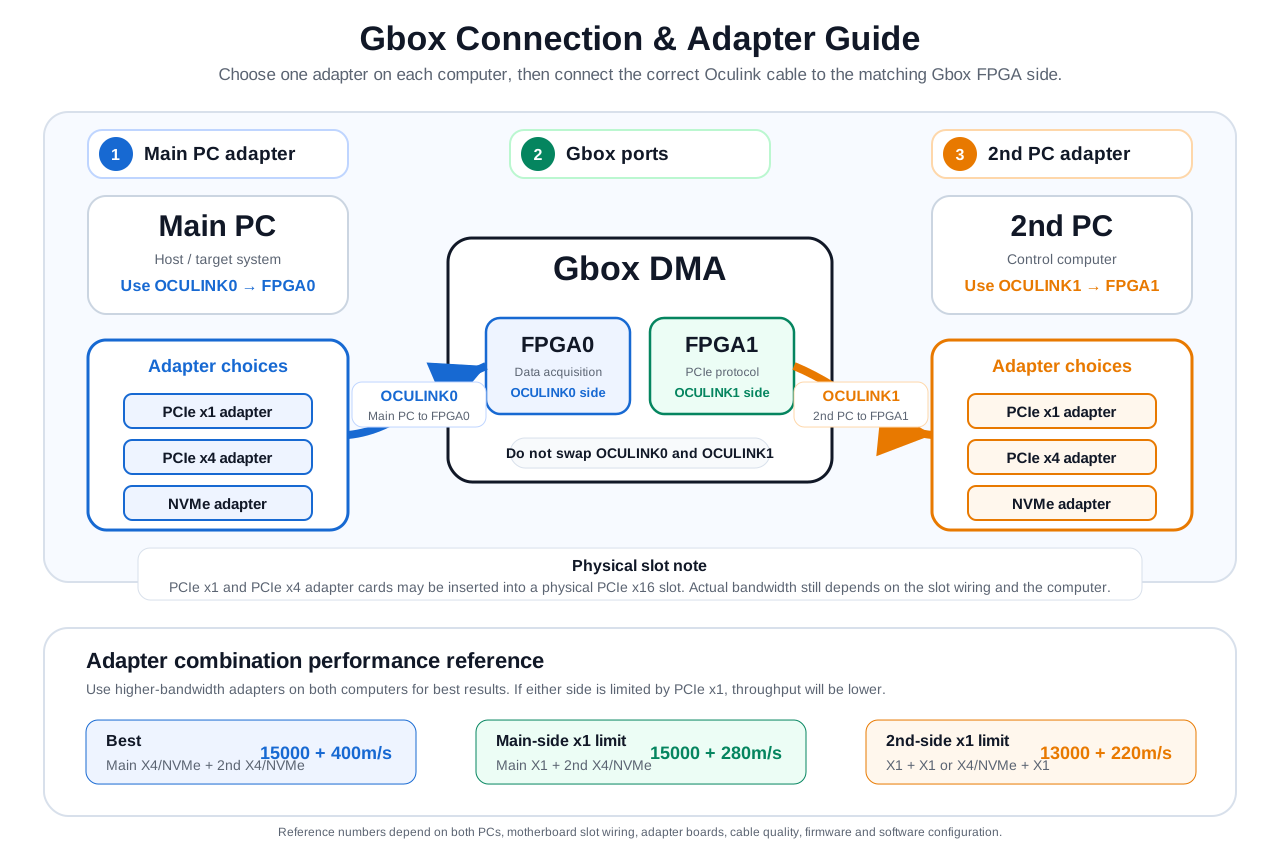
Based on ZDMA, Gbox is designed to give users faster speeds than regular DMA devices at a lower price. It uses two 35T FPGA chips: FPGA0 handles PCIe data acquisition, while FPGA1 handles PCIe protocol communication.
PCIe protocol over Oculink
Multiple adapter options
Unlike regular DMA products where FT601 is responsible for USB protocol communication, Gbox keeps the communication path on PCIe. The open-source firmware for Gbox FPGA0 will be released soon, allowing developers to create custom firmware just like with other regular DMA devices.
Why Gbox exists
ZDMA reaches ultra-high speed through Thunderbolt, but that can require a PCIe x4 slot and a Thunderbolt-capable setup. Gbox was developed to offer strong high-speed compatibility across more PC configurations while keeping the price lower.
- Works with PCIe x1 / PCIe x4 / PCIe x16 / NVMe adapter options.
- Can be adapted to Thunderbolt / USB4 systems through a Thunderbolt NVMe enclosure where appropriate.
- Designed for users who want PCIe-path performance without relying on a regular USB DMA communication path.
Compatibility notes
Because Gbox transmits PCIe protocol, the second computer must also provide a PCIe/NVMe path, or a Thunderbolt / USB4 interface used through a Thunderbolt hard drive enclosure.
- If the Main PC is a laptop with Thunderbolt / USB4, use a Thunderbolt enclosure to convert the interface to NVMe.
- Different adapters can be selected depending on each computer’s available slots.
- Actual performance depends heavily on the computers, slots, adapter boards, cables, and firmware/software environment.
Adapter choice and performance reference
The adapter combination matters. PCIe x1 has less bandwidth, so Gbox performance will be reduced when either side operates through a PCIe x1 interface. Use the following numbers as a practical reference, not a universal guarantee.
| Main PC | 2nd PC | Reference |
|---|---|---|
| X4 / NVMe | X4 / NVMe | 15000 + 400m/s |
| X1 | X4 / NVMe | 15000 + 280m/s |
| X1 | X1 | 13000 + 220m/s |
| X4 / NVMe | X1 | 13000 + 220m/s |
Availability and ordering
The first Gbox batch is limited. For current stock status, shipping estimate, and available expansion-card options, please check the product page before ordering.